Introduction
Upgrading your ceiling fan with a smart fan light controller is an easy way to enhance comfort and energy efficiency. Imagine controlling your fan and lights with just a tap on your phone or a voice command. This guide will walk you through how to upgrade your fan, from adjusting speeds to integrating it with your smart home system. You'll learn the benefits and steps to make your home more convenient and energy-efficient.
What is a Smart Fan Light Controller?
Understanding the Role of Smart Fan Light Controllers
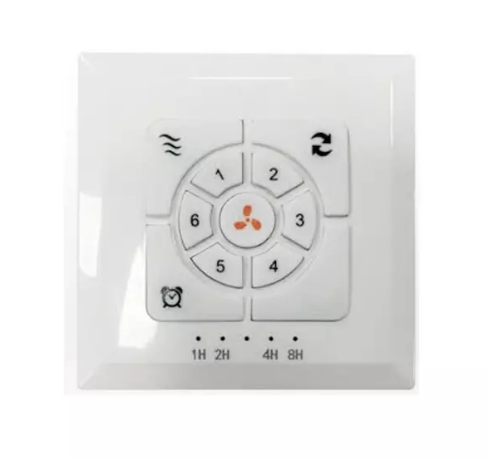
A smart fan light controller allows you to manage the settings of both your ceiling fan and lighting system using a mobile app or voice assistant. This modern upgrade replaces traditional manual switches or pull chains, providing greater convenience, better control, and enhanced energy efficiency. Whether you want to adjust the fan speed, turn the lights on or off, or set schedules, a smart fan light controller makes it possible with just a few taps on your phone or a voice command.
Key Features of Smart Fan Controllers
Smart fan light controllers come with various features designed to enhance your home's comfort and energy management. Key functionalities include:
● Fan Speed Control: Easily adjust the fan speed for optimal airflow.
● Light Dimming: Control the brightness of your ceiling light to create the perfect ambiance.
● Scheduling: Set timers for your fan and light, so they automatically adjust to your daily routines.
● Voice Control: Integrate with voice assistants like Amazon Alexa, Google Assistant, or Apple HomeKit for hands-free operation.

Benefits of Upgrading to a Smart Fan Light Controller
Enhanced Control and Convenience
With a smart fan light controller, you can take full control of your ceiling fan and lighting system from the comfort of your seat. You no longer need to reach for a wall switch or pull chain; simply use your smartphone or voice assistant to make adjustments. Whether you're adjusting the fan speed, dimming the lights, or setting a timer, the convenience of remote control cannot be overstated.
Energy Efficiency and Cost Savings
Smart fan controllers contribute to energy efficiency by automatically adjusting the fan speed and light brightness according to room conditions. For example, the fan can slow down when the room temperature is comfortable or speed up when the room is too warm. This dynamic adjustment ensures that your fan operates only when necessary, reducing electricity consumption and helping you save on energy bills.
Integration with Smart Home Systems
Many smart fan light controllers can be seamlessly integrated into your existing smart home ecosystem. This means you can coordinate the fan with other devices such as thermostats, security systems, and lighting. The integration allows for automation, such as turning the fan on when the room temperature rises or syncing it with motion sensors to activate when someone enters the room.
How to Upgrade Your Ceiling Fan with a Smart Fan Light Controller
Step 1: Choose the Right Smart Fan Light Controller
The first step in upgrading your ceiling fan is selecting the right smart fan light controller. Consider your needs and the features you want, such as fan speed control, dimming capabilities, and Wi-Fi or Bluetooth integration. Make sure the controller is compatible with your current ceiling fan model. Research various brands and read reviews to ensure you're choosing a reliable product.
Step 2: Gather Necessary Tools and Materials
Before starting the installation, gather the tools you’ll need. These typically include:
● Screwdrivers (Phillips and flat-head)
● Wire Strippers
● Voltage Tester
● Electrical Tape
● Wire Connectors
Ensure that the smart fan controller you purchase comes with detailed installation instructions and any necessary wiring kits for your ceiling fan model.
Step 3: Turn Off the Power
For safety reasons, always turn off the power at the circuit breaker before working with electrical components. This step is crucial to avoid electrical shocks and ensure a safe installation process. Use a voltage tester to confirm that the power is off before proceeding.
Types of Smart Fan Light Controllers
Smart Wall Switches
Smart wall switches replace traditional fan and light switches, providing easy control via smartphone apps or voice assistants. They allow you to set schedules, create scenes, and manage fan speeds and lighting. With features like remote control and energy-saving automation, smart wall switches offer an efficient and convenient upgrade.
Smart Remote Controllers
If your ceiling fan already has a remote control, a smart remote controller can integrate it into your smart home system. These controllers use infrared or RF signals to communicate with your fan, enabling you to control fan settings remotely. Smart remote controllers are a great option for fans that already have a remote but need additional smart functionality.
Smart Plugs and Hubs
If you have a whole-house fan or a non-smart fan, a smart plug or hub can help integrate your fan into your home automation system. This solution doesn't require you to replace the fan but allows you to control it through your smartphone or smart home system. It’s a simple and cost-effective way to make your fan smarter.
Step-by-Step Guide to Installing a Smart Fan Light Controller
Step 1: Remove the Existing Fan Switch
Carefully remove the old fan and light switch or remote and disconnect the wiring. Keep track of how the wires are connected, as you’ll need to replicate the connections with your new smart fan light controller.
Step 2: Install the Smart Fan Light Controller
Follow the installation instructions provided with your new smart fan controller. Typically, this will involve connecting the wires for the fan, light, neutral, and ground terminals. Ensure the wiring is done correctly and securely.
Step 3: Connect the Controller to Your Smart Home System
Once the controller is installed, connect it to your Wi-Fi network and sync it with your smart home system. Most smart fan controllers are compatible with apps such as Amazon Alexa, Google Home, or Apple HomeKit. Follow the manufacturer's instructions to complete the setup and ensure your controller works seamlessly with your other smart devices.
Troubleshooting Common Installation Issues
Issue 1: Controller Not Responding to Commands
If your controller isn’t responding to commands, ensure that it's properly connected to your Wi-Fi network. Double-check that the app is correctly linked to your smart home system and that the controller is within the Wi-Fi range. Restart the app or the device if necessary, and confirm that all firmware is up to date.
Issue 2: Incompatible Wiring
Incompatible wiring can occur, especially with older ceiling fans. Review the wiring diagram for both your ceiling fan and the controller to ensure proper connections. Some older models may need an additional module or adapter to work with newer smart controllers. Check for any loose connections or incorrect wiring.
Issue 3: Connectivity Issues
For connectivity issues, try resetting your Wi-Fi router and make sure the controller is within the Wi-Fi range. Re-pair the controller with the app and check for any network interference. If the issue persists, check the manufacturer's troubleshooting guide or contact their support team for assistance.
Conclusion
Upgrading your ceiling fan with a smart fan light controller is a simple way to enhance comfort, convenience, and energy efficiency. By following this guide, you can take control of your fan and lighting, reduce energy bills, and integrate your fan into your smart home system. Products from GUANGDONG SHUNDE SANKEY ELECTRONIC TECHNOLOGY CO.LTD provide valuable upgrades, offering improved functionality and energy savings for a smarter home.
FAQ
Q: What is a Smart Fan Light Controller?
A: A smart fan light controller is a device that allows you to control your ceiling fan and lighting remotely, offering features like speed control, dimming, and scheduling.
Q: How can I upgrade my ceiling fan with a Smart Fan Light Controller?
A: To upgrade your ceiling fan, choose a compatible smart fan light controller, install it with the necessary tools, and sync it with your smart home system.
Q: Why should I use a Smart Fan Light Controller?
A: A smart fan light controller enhances convenience, improves energy efficiency, and gives you remote control over fan speeds and lighting, all integrated into your smart home.
Q: Can I control my ceiling fan remotely with a Fan Light Controller?
A: Yes, a fan light controller allows you to control your ceiling fan remotely via a mobile app or voice assistant, offering added convenience.
Q: Is a Fan Light Controller compatible with all ceiling fans?
A: Not all ceiling fans are compatible. Be sure to check your fan’s model and the controller's compatibility before installation.
Q: How does a Smart Fan Light Controller save energy?
A: By automatically adjusting fan speeds based on room conditions, a smart fan light controller optimizes airflow, reducing the need for air conditioning and saving energy.