

Views: 0 Author: Site Editor Publish Time: 2025-12-24 Origin: Site


Looking for a way to enhance your home comfort? Ceiling fans are essential for maintaining a pleasant atmosphere. Remote control ceiling fans offer unmatched convenience, allowing effortless adjustments from anywhere in the room. However, proper wiring is crucial for safety and functionality. In this article, you’ll learn how to effectively wire a ceiling fan controller for optimal performance.
A ceiling fan controller is a device that allows you to operate your ceiling fan and its lights from a distance, usually via a remote. This controller simplifies the user experience by eliminating the need for pull chains or wall switches. Instead, it offers a more modern way to adjust settings conveniently.
Remote control systems typically consist of two main components: the receiver and the remote. The receiver is installed within the fan or in the ceiling junction box, while the remote is handheld. When you press a button on the remote, it sends a signal to the receiver, which then adjusts the fan speed or lighting according to your command. This seamless interaction makes ceiling fans much easier to use.
1. Convenience of Wireless Operation
Imagine adjusting your ceiling fan without getting up from your couch. With a remote control ceiling fan, this is possible! You can easily change the speed or turn on the lights from anywhere in the room. This feature is especially handy during gatherings or movie nights when you want to stay comfortable without interruptions.
2. Flexibility in Controlling Fan Speed and Light Settings
Remote control ceiling fans typically offer multiple speed settings—low, medium, and high. This flexibility allows you to customize airflow based on your comfort level. Additionally, most models include light dimming options, enabling you to adjust brightness to suit various moods or activities.
3. Energy Efficiency and Cost Savings
Using a ceiling fan controller can lead to significant energy savings. By adjusting the fan speed according to your needs, you can reduce electricity costs. For instance, running your fan on a lower speed during cooler months can help circulate air without overworking the motor. SANKEY focuses on energy-efficient designs in their ceiling fan controllers, ensuring that you enjoy comfort while minimizing energy consumption.
Feature |
Description |
Wireless Operation |
Control from any part of the room. |
Multiple Speed Settings |
Choose from low, medium, and high speeds. |
Light Dimming Options |
Adjust brightness for different activities. |
Energy Efficiency |
Designed to minimize electricity usage. |
With these features, SANKEY ceiling fan controllers enhance your comfort while promoting energy savings. Enjoy the convenience and flexibility they bring to your living space!
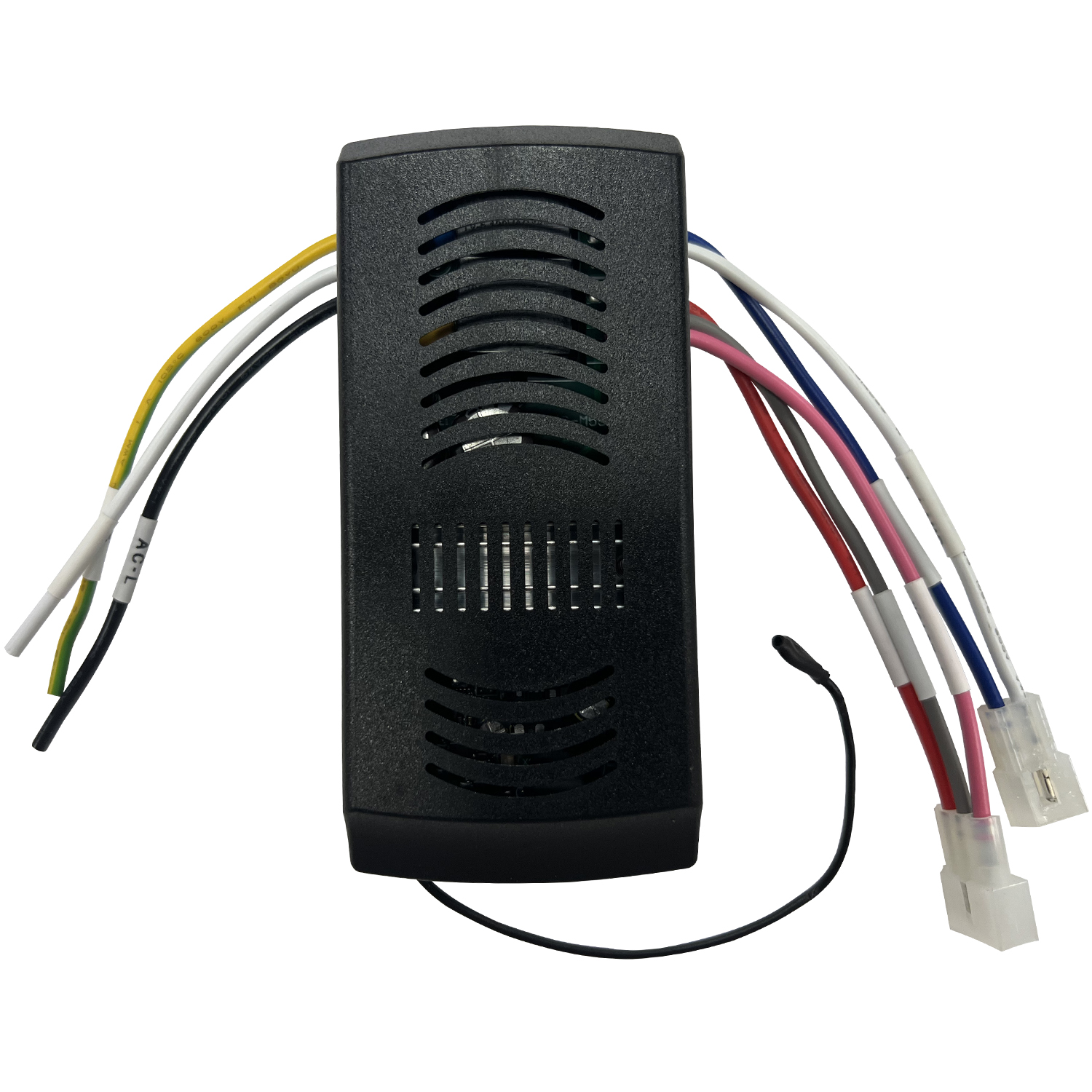
Before diving into the wiring process, having the right tools on hand is crucial. Here’s a list of essential tools you’ll need to ensure a smooth installation of your ceiling fan controller:
● Wire Strippers/Cutters
These are essential for preparing your wires. They allow you to strip insulation from the ends of the wires without damaging the metal underneath. A good pair will make your connections clean and secure.
● Voltage Tester
Safety first! A voltage tester helps you confirm that the power is off before you start working. This tool ensures you won’t accidentally shock yourself during installation. It’s a small investment for peace of mind.
● Screwdrivers (Phillips and Flathead)
You’ll need both types of screwdrivers to secure various components. Phillips screwdrivers are typically used for screws with a cross shape, while flathead ones work for slotted screws. Having both handy makes the job easier.
● Electrical Tape and Wire Nuts
Electrical tape is vital for securing wire connections and preventing short circuits. Wire nuts are used to safely connect multiple wires together. They come in different sizes, so make sure to have a variety on hand.
In addition to tools, you’ll need specific materials to complete the wiring of your remote control ceiling fan. Here’s what you should gather before starting:
● Remote Control Kit
This kit usually includes the receiver, remote control, and a wiring diagram. The receiver is crucial as it communicates between the remote and the ceiling fan, allowing you to control it wirelessly.
● Two Single-Pole Wall Switches
If you plan to control the fan and light separately, having two single-pole wall switches is essential. These switches will allow you to turn the fan and light on and off independently, giving you more control over your comfort.
● SANKEY Products
SANKEY offers various remote control kits that come with comprehensive wiring diagrams. These diagrams simplify the installation process, making it easier for you to connect everything correctly. Their user-friendly designs ensure that even beginners can follow along without confusion.
Tool/Material |
Purpose |
Wire Strippers/Cutters |
Prepare wires for connections. |
Voltage Tester |
Ensure power is off before working. |
Screwdrivers |
Secure components during installation. |
Electrical Tape |
Insulate and secure wire connections. |
Remote Control Kit |
Allows wireless operation of the ceiling fan. |
Wall Switches |
Enable independent control of fan and light. |
SANKEY Wiring Diagrams |
Provide clear instructions for installation. |
Having these tools and materials ready will set you up for success as you wire your ceiling fan controller. It’s all about preparation, so gather everything before you start!
Before you start wiring your ceiling fan controller, safety is paramount. The first step is to turn off the power at the breaker box. This action prevents any accidental shocks while you work. It’s crucial to ensure that all electrical current is cut off to the area where you'll be installing the fan.
Once the power is off, the next step is to use a voltage tester. This handy tool confirms that there is no electricity flowing to the wires you'll be handling. Simply touch the tester to the wires; if it lights up or beeps, the power is still on. Taking these precautions protects you and ensures a smooth installation process.
Now that safety is taken care of, let’s assess the installation site. First, check the ceiling box for stability. This box should be securely mounted and capable of supporting the weight of the ceiling fan. If it appears loose or damaged, replace it before proceeding. A sturdy ceiling box is essential for safe operation.
Next, ensure that the installation site is compatible with your ceiling fan model, especially if you're using SANKEY's range of ceiling fans. SANKEY fans are designed with specific mounting requirements, so verify that your ceiling box meets these standards. Look for labels or instructions that indicate weight limits and compatibility.
Task |
Description |
Turn Off Power |
Switch off the breaker to avoid electrical shocks. |
Use Voltage Tester |
Confirm no power is running to the wires. |
Check Ceiling Box Stability |
Ensure it can support the fan's weight. |
Verify Compatibility |
Match the ceiling box with SANKEY fan requirements. |
By following these steps, you’ll set a solid foundation for your ceiling fan installation. Ensuring safety and compatibility will lead to a successful and efficient wiring process.
Before diving into the wiring process, it’s essential to understand the functions of each wire involved. Each color serves a specific purpose, ensuring your ceiling fan controller operates correctly. Here’s a breakdown of the wire colors and their functions:
● Black Wire (Hot)
This wire carries the electrical current from the power source to the fan. It’s essential for the fan’s operation.
● Blue Wire (Light)
The blue wire specifically controls the light fixture attached to the ceiling fan. This allows you to operate the light independently.
● White Wire (Neutral)
The white wire returns the current back to the power source, completing the circuit. It’s crucial for the safe operation of your fan.
● Green Wire (Ground)
This wire is a safety feature, grounding the electrical system to prevent shocks. Always connect this wire to a grounding point.
● Red Wire (Receiver)
The red wire connects to the ceiling fan receiver, allowing the remote control to communicate with the fan. This connection is key for wireless operation.
Now that you know the wire functions, let’s go through the wiring process step by step. Follow these instructions carefully for a successful installation.
First, ensure your safety by turning off the circuit breaker. This action cuts the power to the fan and prevents any risk of electrical shock. After switching off the breaker, use a voltage tester to confirm that no power is flowing to the wires. This step is critical before proceeding.
Next, it’s time to connect the ceiling fan receiver. Begin by locating the receiver, which is typically housed within the fan’s mounting bracket or near the ceiling box. Follow these steps:
1. Connect the black wire from the ceiling fan to the black wire on the receiver.
2. Attach the white wire from the fan to the white wire on the receiver.
3. Connect the blue wire (for the light) to the corresponding wire on the receiver.
4. Finally, attach the red wire from the receiver to the power source.
SANKEY's remote control ceiling fan receiver is designed for ease of use, featuring clear labeling for each wire connection. This user-friendly design helps eliminate confusion during installation.
If you plan to control the fan and light separately using wall switches, follow these wiring instructions:
● Connect one switch to the black wire (hot) and the other switch to the blue wire (light).
● Ensure that both switches are properly grounded using the green wire. This setup allows you to independently control the fan and light, enhancing your comfort and convenience.
Once everything is connected, it’s time to restore power and test your installation. Here’s how to do it:
1. Turn the circuit breaker back on and check that the power is restored.
2. Use the remote control to test the fan’s operation. Adjust the speed settings and ensure the light functions correctly.
3. If any issues arise, double-check your connections and make sure each wire is securely attached.
Wire Color |
Function |
Black |
Hot wire for fan operation |
Blue |
Controls the light fixture |
White |
Neutral wire returning current |
Green |
Ground wire for safety |
Red |
Connects to the receiver for remote control |
Following these steps will ensure your ceiling fan controller is wired correctly, providing a seamless and enjoyable experience. Enjoy the comfort and convenience of your newly installed remote control ceiling fan!
If your ceiling fan isn’t responding to the remote control, it can be frustrating. Several factors could be causing this issue, but don’t worry—most of them are easy to fix. Here are some possible causes and their solutions:
1. Battery Issues
The most common reason for a non-responsive remote is dead batteries. Check the remote control and replace the batteries if needed. Always use fresh, high-quality batteries for optimal performance.
2. DIP Switch Settings
Many remote control systems, including those from SANKEY, use DIP switches for pairing the remote with the fan. If these switches aren’t set correctly, the remote won’t communicate with the fan. Refer to the user manual to locate the DIP switch settings on both the remote and the receiver. Ensure they match.
3. Interference from Other Devices
Sometimes, other electronic devices can interfere with the remote signal. Try moving any nearby devices away from the fan and see if that resolves the issue.If you continue to experience problems, SANKEY offers excellent customer support resources. Their team can provide troubleshooting assistance and help you identify any issues.
Inconsistent fan speed or light functionality can be another common problem. This issue often stems from wiring mistakes or loose connections. Here’s how to troubleshoot and fix these problems:
1. Common Wiring Mistakes
If the fan speed isn’t consistent, it could be due to incorrect wire connections. Double-check that the black wire (hot) and blue wire (light) are correctly connected to the receiver. Ensure that the white wire (neutral) is also properly secured.
2. Ensuring Proper Connections
For SANKEY ceiling fan models, it’s essential to follow the wiring diagram included in the installation manual. Pay close attention to the specific connections required for your model. Loose or incorrect connections can lead to erratic fan behavior.
3. Testing Each Component
If you’ve checked the wiring and everything appears correct, test each component individually. Use the remote to adjust the fan speed and light settings. If one function works but the other doesn’t, the issue may lie within the specific component (e.g., the light fixture or the fan motor).
Issue |
Possible Cause |
Solution |
Fan not responding |
Dead batteries |
Replace batteries in the remote. |
Incorrect DIP switch settings |
Match DIP switches on remote and receiver. |
|
Interference from other devices |
Move nearby electronics away from the fan. |
|
Inconsistent speed or light |
Incorrect wiring |
Verify connections according to the manual. |
Loose connections |
Tighten all wire connections securely. |
|
Faulty component |
Test each component for functionality. |
By following these troubleshooting tips, you can quickly identify and resolve common issues with your ceiling fan controller. Enjoy the comfort and convenience of your ceiling fan without the hassle of technical difficulties!

Keeping your ceiling fan clean is crucial for optimal performance and longevity. Dust and debris can accumulate on the blades and motor, causing the fan to work harder and potentially leading to mechanical issues. Regular cleaning not only enhances airflow but also improves the overall aesthetic of your space.
To clean your SANKEY ceiling fan effectively, consider using the following products:
● Microfiber Cloths
These are excellent for dusting off the blades without scratching their surface. They trap dust effectively, making your cleaning routine easier.
● Gentle All-Purpose Cleaner
A mild cleaner can help remove stubborn grime. Ensure it’s safe for use on electronics and doesn’t contain harsh chemicals that could damage the fan's finish.
● Vacuum Cleaner with Brush Attachment
This can be used to clean around the motor and the ceiling box. It helps remove dust buildup that can affect performance.
Cleaning Steps:
1. Turn off the fan and ensure it’s completely stopped.
2. Use a microfiber cloth to wipe down the blades, starting from the center and moving outward.
3. For more thorough cleaning, spray a small amount of all-purpose cleaner on the cloth before wiping.
4. Inspect the fan for any signs of wear or damage during cleaning.
Maintaining the remote control system is just as important as caring for the fan itself. A well-functioning remote ensures you can easily control your ceiling fan and its lighting features. Here are some tips to keep your remote control and receiver in top shape:
1. Battery Replacement
Check the batteries in your remote control regularly. If the fan isn’t responding, replacing the batteries is often the simplest solution. Always use high-quality batteries to ensure reliability.
2. Inspecting the Receiver
The receiver is usually located in the ceiling mount or near the fan. Ensure it’s securely connected and free from dust. If you experience issues, reseat the connections to ensure they’re tight and clean.
3. Troubleshooting Common Issues
If the remote control is unresponsive, try resetting it. Remove the batteries, press all buttons, and then reinstall the batteries. This can sometimes resolve minor glitches.
4. Emphasizing Reliability
SANKEY products are known for their durability and reliability. Regular maintenance will help you enjoy the benefits of your ceiling fan for years to come. Their customer support is also available to assist with any troubleshooting needs.
Maintenance Task |
Frequency |
Notes |
Clean Fan Blades |
Every month |
Use microfiber cloths and mild cleaners. |
Inspect Motor and Ceiling Box |
Every 3 months |
Look for dust buildup and secure connections. |
Check Remote Batteries |
Every 6 months |
Replace with high-quality batteries. |
Test Remote Functionality |
Monthly |
Ensure all buttons respond correctly. |
By following these maintenance tips, you can ensure that your remote control ceiling fan remains in excellent condition, providing comfort and convenience in your home.
Proper wiring is essential for remote control ceiling fans. It ensures safety and optimal performance. Always follow safety guidelines and manufacturer instructions during installation.
Using a ceiling fan controller offers great convenience in managing your fan and light. SANKEY's commitment to quality and innovation makes their products reliable and user-friendly. Enjoy the comfort and efficiency of your ceiling fan!


